
If Lagos Life is not working, first separate a page that will not load from an account that will not sign in. Use lagoslife.app. When the login screen opens, its Forgot password? and Can’t get in? routes provide official recovery and help options. A local failure alone does not establish a global outage.
Choose your symptom
| What you can see | Next supported check | Stop condition |
|---|---|---|
| The official page does not open | Check the address and whether other pages load in the same browser and connection. | If the service remains unreachable, save the error and time; repeated account creation cannot fix a page-load failure. |
| Page opens but login fails | Check username/email and password; use the recovery option if needed. | If you cannot complete recovery, use the official help screen. |
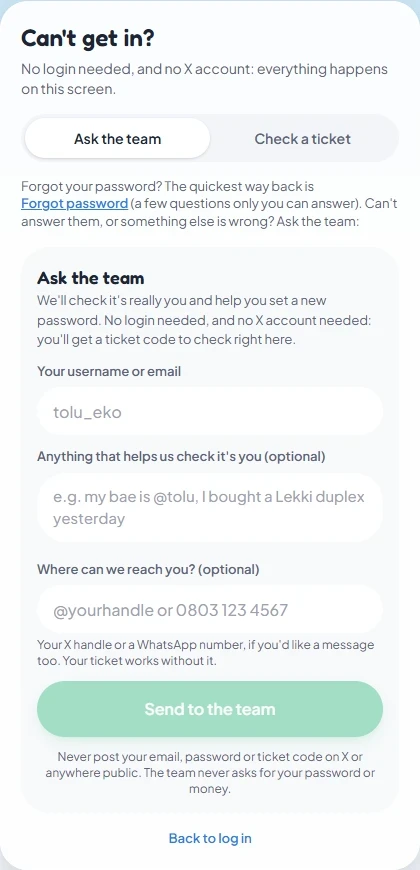
| Recovery is not enough | Open Log in → Can’t get in? → Ask the team. | Keep the ticket code and check it through Check a ticket. |
| A payment was collected but a purchase is missing | Preserve the payment reference, amount and status for official support. | Do not repeatedly pay to test whether delivery resumes. |
The initial address, connection and typing checks are general browser triage, not developer-confirmed fixes for a named error. This page does not diagnose an unspecified error code or claim a current outage.
Cookies and browser data
The official privacy policy says necessary cookies support authentication, sessions, security and core functions, and that disabling them can prevent parts of the service from working. Allowing necessary cookies for the official game is a relevant check if you disabled them.
Deleting site cookies can end your session; clearing local data can also remove saved preferences. Establish that you know your login and can use recovery before taking those actions. This guide does not recommend clearing everything as a universal fix or promise that doing so restores gameplay progress.
Reach official help
The public Can’t get in? screen asks for your username or email, optional ownership details and optional contact information. It says no login or X account is needed and provides a ticket code you can check on that screen. Do not post your email, password or ticket publicly; its warning says the team never asks for a password or money.
For account problems, the login guide gives the recovery-screen options. For a missing purchase, the Terms list [email protected] and explain that payment-provider records and the internal ledger are used to investigate delivery. No support request, reset or payment was submitted while checking these screens.
When to stop repeating an action
The Terms acknowledge maintenance, outages and technical interruptions without guaranteeing uninterrupted access. That policy is not a live status feed. If the same action fails, retain the exact message, device/browser, time and relevant transaction reference, then use official support when accessible. Do not send passwords, try a money generator or create accounts to evade a restriction.
Sources and scope
Prepared from public source material and the screens identified below. This guide does not claim an in-game playtest.
- Lagos Life — Log in formPublic form checked 16 October 2026; no credentials submitted.
- Lagos Life — Forgot password screenRecovery options inspected 16 October 2026; no reset requested.
- Lagos Life — Can't get in? help screenHelp and ticket controls inspected 16 October 2026; no ticket submitted.
- Lagos Life — Privacy & Cookie PolicyEffective 1 October 2026; wording checked 16 October 2026.
- Lagos Life — Terms of UseEffective 1 October 2026; wording checked 16 October 2026.
Browse all available guides · Return to the Lagos Life overview