
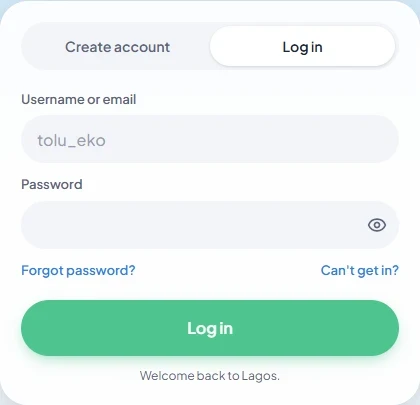
To log in to Lagos Life, open lagoslife.app, choose Log in, and enter your username or email and password. If you cannot regain access, the same screen provides Forgot password? and Can’t get in? options; you do not need an X account to ask for help.
Sign in to an existing account
Use the Log in tab rather than Create account. Enter the identifier belonging to your existing Sim and your password, then select Log in. The show-password control can help check a typing mistake when nobody else can see your screen.
The form’s Username or email label supports either identifier. It does not offer social sign-in, consistent with the privacy policy. Creating a second account is not a password-reset method. If you have never registered, choose Create account on the official service instead.
Recover access
Choose Forgot password? to open the recovery form. The inspected email view says it will send a link for choosing a new password. It also offers With my username and Can’t open your email? Answer questions instead. Follow the prompt for the identifier you can supply; the questions option first asks for your email in the inspected interface.
Opening a recovery form does not mean a reset has succeeded. Follow the service’s resulting instructions and then return to Log in. No reset request or account recovery was submitted while preparing this guide, so email delivery time and successful recovery are not claimed here.
Ask the team and keep the ticket
If recovery is unavailable or the account has another problem, return to login and choose Can’t get in?. Ask the team requests your username or email, optional details that help establish ownership, and optional contact information. The screen says it supplies a ticket code that can be checked there through Check a ticket, without logging in.
Keep that code private. The official screen warns against posting an email, password or ticket publicly and says the team never asks for a password or money. Do not send credentials through this guide. For loading failures before you can reach the form, use browser and loading help.
Sources and scope
Prepared from public source material and the screens identified below. This guide does not claim an in-game playtest.
- Lagos Life — Log in formPublic form checked 16 October 2026; no credentials submitted.
- Lagos Life — Forgot password screenRecovery options inspected 16 October 2026; no reset requested.
- Lagos Life — Can't get in? help screenHelp and ticket controls inspected 16 October 2026; no ticket submitted.
- Lagos Life — Privacy & Cookie PolicyEffective 1 October 2026; wording checked 16 October 2026.
Browse all available guides · Return to the Lagos Life overview